Управление строительствомHSH#HSH#Straus7#Software#Structural calculations#Finite element (FEM) structural resolvers
HSH - BASE
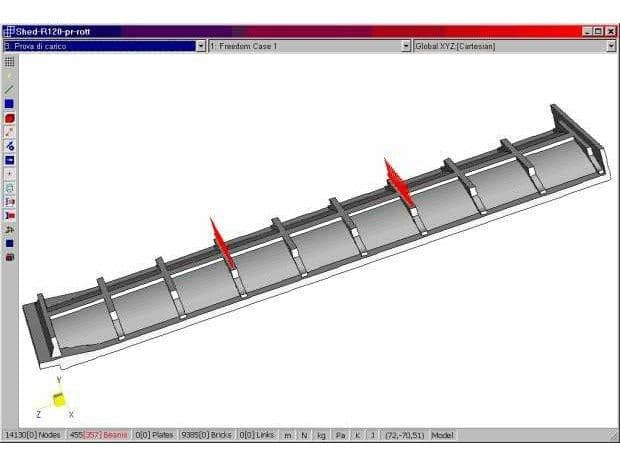
Straus7 is the software for linear and non-linear analyses of structures in the static and dynamic domains. It has a fully integrated model pre-processing and post-processing environment and a wide range of solvers for different analyses.
All the modules that make up the calculation system have been implemented by a single team of developers and coherently integrated within a powerful, yet easy-to-use graphical user interface.
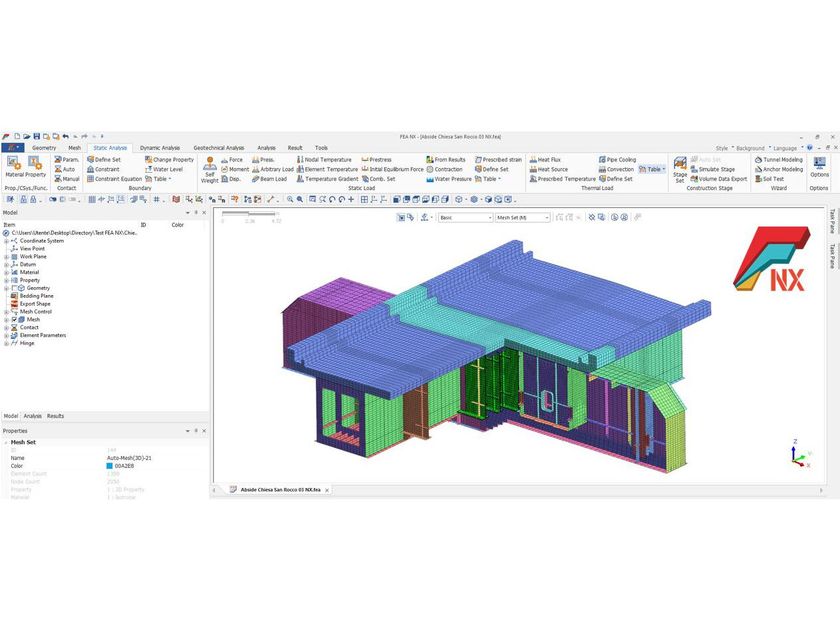
The Straus7 base module consists of a graphical user interface that allows the creation, modification and manipulation of finite element models. In addition, the module provides the necessary tools for visualising results and for post-processing.
Among the solvers included in the basic module are the static and dynamic linear solver, the linear solver in structural transient, the solver for seismic analysis, for spectral and harmonic analysis, and the thermal solvers in both steady-state and thermal transient.
- Pre Processor.
- Post Processor.
- Import and export IGES, STEP, STL and DXF formats.
- Import SAT, 3DM formats.
- Import and export NASTRAN, ANSYS formats.
- Import STAAD-Pro, SAP2000 formats.
- Linear Static solver.
- Linear Buckling solver.
- Natural Frequency solver.
- Harmonic Response solver.
- Spectral Response solver.
- Linear Transient Dynamic solver.
- Steady State Heat solver.
- Transient Heat solver.
PRE-PROCESSING
" GENERALITY
The finite element code Straus7 has general pre-processing functions for direct manual input of finite element models. Several tools are available in this regard, such as:
- Copy, extrude, scale, move and mirror operations for the easy insertion of nodes and elements.
- All operations can be conducted relative to generic coordinate systems such as Cartesian, cylindrical, spherical, toroidal.
- Automatic division of elements with maintenance of boundary conditions.
- Functions for automatic thickening of two- and three-dimensional models.
- Specific functions for the treatment of rod systems imported from DXF format.
- Automatic alignment functions for local axes in one-dimensional elements.
- Functions for the automatic assignment of nodal offsets, in relation to the type of section used.
- Automatic generation of rigid planes or clusters.
Many of the model creation operations can be performed in copy-paste mode from other programmes. Such modes also extend within the windows of a Straus7 session. Separate construction of sub-models and their final assembly is then easy. Entities can be associated with logical groups to facilitate the operations of entering the model or reading the results.
" MESH/MODEL GENERATION - GENERAL FUNCTIONS
Straus7 automatically generates two-dimensional meshes with mainly quadrangular ('quad-dominant') elements of high quality.
" MODEL CHECKING AND VERIFICATION TOOLS
Straus7 provides very valuable tools for checking the correctness of finite element models:
- Graphical determination of nodal discontinuities internal to the model.
- Graphical restitution of histograms of the quantities characterising the quality of the model (e.g. shape factors and parameters related to the distribution of internal angle amplitudes for two- and three-dimensional elements).
- Graphical representation of applied loads.
" DATA IMPORT FROM CATALOGUE/DATABASE
Straus7 has an extensive library of worldwide commercial profiles as well as a large number of libraries for the most common construction materials (steel, concrete, wood, aluminium, glass and others). The static characteristics of a generic section can be imported and read from Straus7 to be used and displayed in a realistic solid mode within the calculation environment. The user also has considerable control over the customisation of libraries, being able to create their own or modify existing ones.
TYPES OF ANALYSES
" LINEAR STATIC ANALYSES
- The solver used for linear systems of equations generated in Straus7 is a sparse type with optimal pre-ordering (fill-in reducing) of the equations. This solver has demonstrated good performance both in terms of the space occupied by the matrices on disk and in terms of time performance. Thus, even the solution of complex models (possibly generated automatically from geometries), with several hundred thousand equations, can be performed in acceptable times.
- The solver's entire messaging is transmitted to a log file. A log file viewer integrated with the environment is also available, capable of filtering the different information to check only the quantities of interest.
- Automatic saving of sub-models for structural zooming operations under different load conditions.
" COMBINATIONS - INVILUPTIONS
- Possibility of entering any number of load combinations with user-defined coefficients. No need to relaunch the linear static solver to define or modify combinations.
- Possibility of combining different result files, with extension to SRSS combinations of spectral solutions corresponding to different seismic directions. This is considered by the text of Ordinance 3274 as the preferred mode of combination for the various directions of seismic action.
- Extended envelope capacities:
- Overlapping envelopes for the determination of more severe conditions in relation to known combinations.
- Envelopes in combination. They allow Straus7 to combine those conditions that produce the extreme effects on two- or three-dimensional members or entities.
- Envelopes with factors. They constitute a rather complex type of envelope such that load combinations for ultimate and serviceability limit states can be automated in relation to current standards.
- There are also ways of obtaining the resulting quantities in equilibrium with an extreme value obtained in the envelopes.
" ANALYSIS OF OWN FREQUENCIES
- Straus7 has an eigenfrequency solver based on the subspace method. Possibility of operating a 'shift' in the frequency calculation. Checking of results obtained via Sturm sequence. Calculation of modal participation coefficients in any direction in space, directly in the frequency calculation.
- Functions for introducing tangent stiffnesses (specific step of a non-linear solution) in the calculation of eigenfrequencies. It is also possible to consider the influence of the tensional state in the extraction of eigenfrequencies.
- The user has full access to the parameters used by the solver such as tolerances, number of iterations, formulation of masses and more.
" MODAL RESPONSE SPECTRUM ANALYSIS
- Straus7 generates modal results, SRSS and CQC combinations (optionally some of these can be excluded) for each defined spatial direction vector.
- Generic response spectrum analyses are supported in terms of both base accelerations, velocities or displacements.
- The inertia forces generated in the individual modes or their SRSS and CQC combination can be obtained explicitly and can be imported as thrust distributions for pushover analyses.
" BUCKLING ANALYSIS
- In the Straus7 environment, the user can generate linear buckling analyses from linear tension states with initial stiffnesses or from tangent stiffness states from non-linear solution steps.
REPRESENTATION OF DEFORMATIONS AND STRESS STATES
- Realistic representation of one-dimensional elements also defined by the user. One-dimensional elements can also be represented in solid mode with reference to the tensional state.
- Multi-view representation of the deformations of individual vibration modes is possible for quick comparison.
- Straus7 can automatically generate animations in relation to modal deformations (also in multiview) or individual static or dynamic results. Animations can then be saved in self-executable format or as a series of slides (JPG or BMP).
Straus7 has the following post-processing tools:
- Colour map representations of resulting quantities. The representations extend to stress diagrams for beam elements as well as vector quantities such as constraint reactions or principal stresses.
- Representations of amplified deformations. Noteworthy in this respect is the possibility of saving the model with a deformed configuration superimposed on the original coordinates. This allows the study of accidental eccentricities in non-linear incremental procedures.
- Querying of resulting quantities referring to individual entities. For each individual node or element, the extraction of all post-processing result quantities is possible. The user can also automatically find the entities that make the considered quantities extreme.
- Straus7 allows the generation of two-dimensional graphs in relation to:
- Position variation for a single resultant case.
- Variation of the resulting case for a single observed quantity.
- Series of even non-aligned points for plotting the quantity of interest in any path.
- Straus7 has a function to obtain the complete list of resulting quantities in spreadsheet format. All data can be used in other applications, even third parties, by simple copy-paste operations.
For three-dimensional elements, it is possible to obtain sections in any position referring to Cartesian, cylindrical, spherical and toroidal co-ordinate systems. Straus7 automatically determines the integral of the displayed quantities by determining their static moments also with respect to the section's centre of gravity.
POST-PROCESSING
Release 2.3 of Straus7 does not originally have any post-processor for the verification of particular materials in relation to specific standards. In the logic of the implementation of the calculation code, the following tools are available to the user for customisation and specific post-processing of the results:
- The API module provides the user with an easy way to automate their own verification procedures.
- Returning the resulting quantities in tabular form allows them to be easily retrieved by copy-paste operations or export to a text file.
" AVAILABLE OUTPUTINTERFACES
Straus7 has the following output interfaces in relation to both CAD and CAE applications:
- ASCII own text format. This format allows backwards compatibility between the various Straus7 releases.
- MSC-NASTRAN format. This format is considered a standard exchange format for CAE applications.
- AutoCAD DXF format. Automatic saving in DXF format is possible. Membranes can be exported in both single and solid mode. The hierarchy of assemblies defined in the Straus7 environment can be mapped by defining multiple 'layers' in AutoCAD.
- Static model images can be exported in formats such as BMP (Windows Bitmap) or JPG at different compression levels.
ELEMENT LIBRARY
"FINITE ELEMENT TYPE 'BEAM
"BEAM' FINITE ELEMENT ATTRIBUTES
" PLATE/SHELL TYPE FINITE ELEMENTS
" FORMULATIONS FOR TWO-DIMENSIONAL ELEMENTS
" ATTRIBUTE TYPES AVAILABLE FOR TWO-DIMENSIONAL ELEMENTS
"THREE-DIMENSIONAL FINITE ELEMENTS
" VARIABILITY LAWS FOR ALL ELEMENTS IN THE LIBRARY
DOCUMENTATION
" AVAILABLE DOCUMENTATION
The following user manuals are made available to users:
- Introductory manual for using Straus7. This manual describes in a simple way the most frequently used functions for creating and checking the correctness of models.
- Theoretical manual with more than 400 pages containing details on:
- Fundamental equations
- Implemented constitutive laws.
- One-dimensional elements.
- Two-dimensional elements.
- Three-dimensional elements.
- Implementations of Links.
- Theory and implementation of solvers.
- Material non-linearity.
- Geometric non-linearity.
- Details of implemented numerical methodologies.
- Tutorials. The Straus7 introduction manual includes several step-by-step tutorials for initial familiarisation with pre-processing, post-processing and solving models.
- Tutorial for the automatic mesh generation module. This tutorial includes numerous examples illustrating the functionality offered by Straus7 in relation to the repair of geometry imported from a CAD environment. It also discusses the assignment of load and constraint attributes to the imported geometry model, and the parameters to be used for optimal generation of two- and three-dimensional elements.
- Straus7 API (Application Programming Interface) Manual. The module known as the Straus7 API is fully documented, with code examples and particularities of use for the various compilers supported.
" HELPON-LINE
An extensive context-sensitive online help is available. It contains all the information needed to use the interface as well as an extensive number of theoretical topics that help the user in using the various solvers.
" VALIDATION DOCUMENTATION
A 'Verification Manual' has been compiled for Straus7 users that includes more than 100 validation tests for the different constituent models in Straus7, differentiated according to the solvers used. These tests refer to NAFEMS standards and include linear, non-linear, static and dynamic problems.
Straus7 is the software for linear and non-linear analyses of structures in the static and dynamic domains. It has a fully integrated model pre- and post-processing environment and a wide range of solvers for different analyses.
All modules that make up the calculation system have been implemented by a single team of developers and coherently integrated within a powerful, yet easy-to-use graphical interface.
Straus7 is a calculation and design software for finite element engineering, used worldwide by leading design offices, construction companies, public authorities and universities. It is known for its ease of use, its complete integration into Windows and its flexibility through the availability of stand-alone or network licences. The software offers a range of pre-processing functions for direct insertion of finite element models, including copy, extrusion, scale, displacement and reflection, as well as easy insertion of nodes and elements. The software also allows the processing of rod systems imported from DXF format and the alignment of local axes in one-dimensional elements. In addition, the software provides the option of automatically assigning nodal offsets according to the type of section used and automatically generating rigid planes or rigid clusters.
Straus7 offers the possibility of working on multiple models simultaneously, with the ability to exchange data between models using cut-and-paste tools and solve multiple models together. The software also offers unlimited undo and redo capabilities, allowing all changes made to a model to be undone without concern for model complexity or the number of affected entities.
The software produces high-quality two-dimensional meshes with a predominance of square elements automatically, and provides users with tools for checking the correct implementation of finite element models. Nodal discontinuities within the model can be detected by graphical representation, histograms of the quantities defining the quality of the model can be displayed, and applied loads can be shown graphically.
Straus7 is highly customisable, offering many options for graphical representation, colour definition, light source and perspective. Furthermore, file allocation can be configured, improving network work by sharing specific files on a dedicated drive and leaving temporary files on a different machine, such as a faster PC.
Finally, the Rondo application allows BIM coupling between Straus7 and BIM software for steel structures, offering BIM Coupling functionality. Rondo allows the export of structural steel elements and their connections from the FEM model to the BIM, reducing errors in the BIM modelling of connections through the use of special control tools. Furthermore, Rondò automatically groups the different connection types in the structure, thus simplifying the management of the BIM model.
Further info from manufacturer on Straus7 - BASE HSH
0
0