

Управление строительствомGRAPHISOFT Italia#GRAPHISOFT Italia#Software#BIM, CAD and rendering#2D & 3D CAD technical design#3d solid modelling
GRAPHISOFT Italia
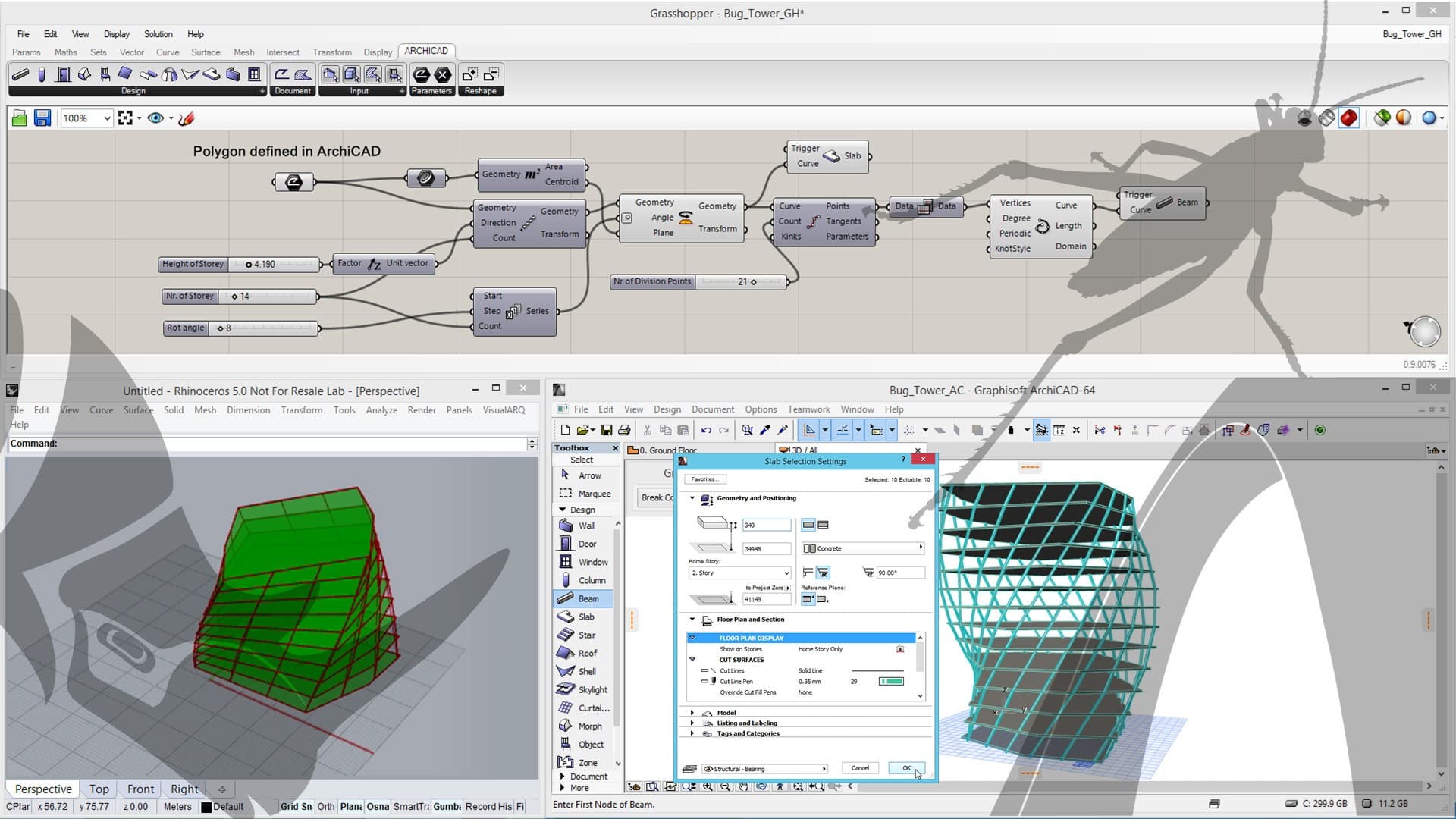
The RHINO - GRASSHOPPER - ARCHICAD Connection combines the best design tools for the different project phases. These tools bridge the design development gap between the initial design phase and Building Information Modeling. This unique solution offers tools that go far beyond the bi-directional transfer of geometry, allowing geometric shapes to be translated into fully BIM elements while retaining algorithmic editing capabilities.
Solutions
Grasshopper - ARCHICAD Live Connection
Generate and manipulate BIM elements in ARCHICAD directly from Grasshopper
Add-ons Import/Export Rhinoceros
The interchange of models in native Rhinoceros file format
Rhinoceros - GDL Converter
Create native ARCHICAD objects in Rhinoceros
Grasshopper - ARCHICAD Live Connection
Generate and manipulate BIM elements in ARCHICAD directly from Grasshopper
This tool allows direct communication between Rhino/Grasshopper and ARCHICAD in order to create and manipulate a BIM model, in whole or in part, through the visual scripting interface of Grasshopper. Designers whose work is currently based on either Rhino/Grasshopper or ARCHICAD can take advantage of this functionality. the live, associative and bi-directional nature of the connection allows users to build versatile workflows and use this connection in multiple scenarios.
In jobs where the design is primarily driven by the use of Rhino-Grasshopper tools, users will be able to apply the GH-AC Connection to convert the design into a fully BIM model and still retain some of the algorithmic editing capabilities. In other cases, Rhino/Grasshopper (or the other Rhino plug-in) can be used to refine an existing BIM design with algorithmic features or a freeform modelling environment at any stage of the design process. In these situations, the layout or reference geometry of parts designed in Grasshopper can be taken directly from ARCHICAD itself.
Rhinoceros Import/Export Add-on
Exchange models in native Rhinoceros file format
Designers can choose to work with a 'reference model workflow' by exporting and importing models between ARCHICAD and Rhinoceros using the native Rhinoceros file format (.3dm).
Rhino Export enables users to pass the geometry - using various representation methods - of a model produced in ARCHICAD to Rhino.
Rhino Import enables users to pass a model created in Rhino to ARCHICAD. The imported model will appear as a GDL object preserving the logic of the construction style of the original Rhino model.
Rhinoceros - GDL Converter
Create native ARCHICAD objects in Rhinoceros
With this set of tools, designers can save a selected part of a Rhino model in a native ARCHICAD object file format (.gsm or .lcf). Depending on the complexity of the model and its subsequent use in ARCHICAD, users can choose whether to generate a single object (.gsm) from Rhino or a library container file (.lcf) containing multiple library elements.
The 'Import Object SIngle' workflow is suggested for importing small objects or groups of small objects in .gsm format into ARCHICAD.
The workflow "Import Complex Structure" is suggested for importing - and also updating - large Rhino models, which are as complex as a coherent set of GDL objects, using an ARCHICAD LCF (Library Container File).
0
0